LPR Updates
A video to demonstrate how to order your parking permit on the new parking portal has been created. Please reference the video below if you’re interested in learning the process of purchasing your parking permit at https://umich.aimsparking.com/
- Overview of Virtual Permit System using License Plate Recognition (LPR)
- General Information
- Registration and Account Management
- License Plates and Parking Orientation
- Payment and Permit Options
- Daily Parking
- Accessible Parking
- Departmental / Guest Parking / Event Parking
- Parking Citations and Enforcement
- Data Security and Opt-Out
- Retirees
- Other Parkers
- Contact Us
Overview of Virtual Permit System using License Plate Recognition (LPR)
Logistics, Transportation & Parking is pleased to announce a significant improvement to the university’s parking system. The parking permit system has transitioned to a Virtual Parking Permit System that uses License Plate Recognition (LPR) technology. This means your vehicle’s license plate will serve as your parking permit, eliminating the need to display a parking permit in your vehicle.
If you have an annual permit and use a gated parking area, your current physical permit (AVI) will still be used for access to the gated parking areas until the equipment in the drive lanes is upgraded to support the new LPR technology. These upgrades are expected to take place in Fall of 2025 through Fall 2026. Please keep your AVI if you plan on continuing to use gated parking areas!
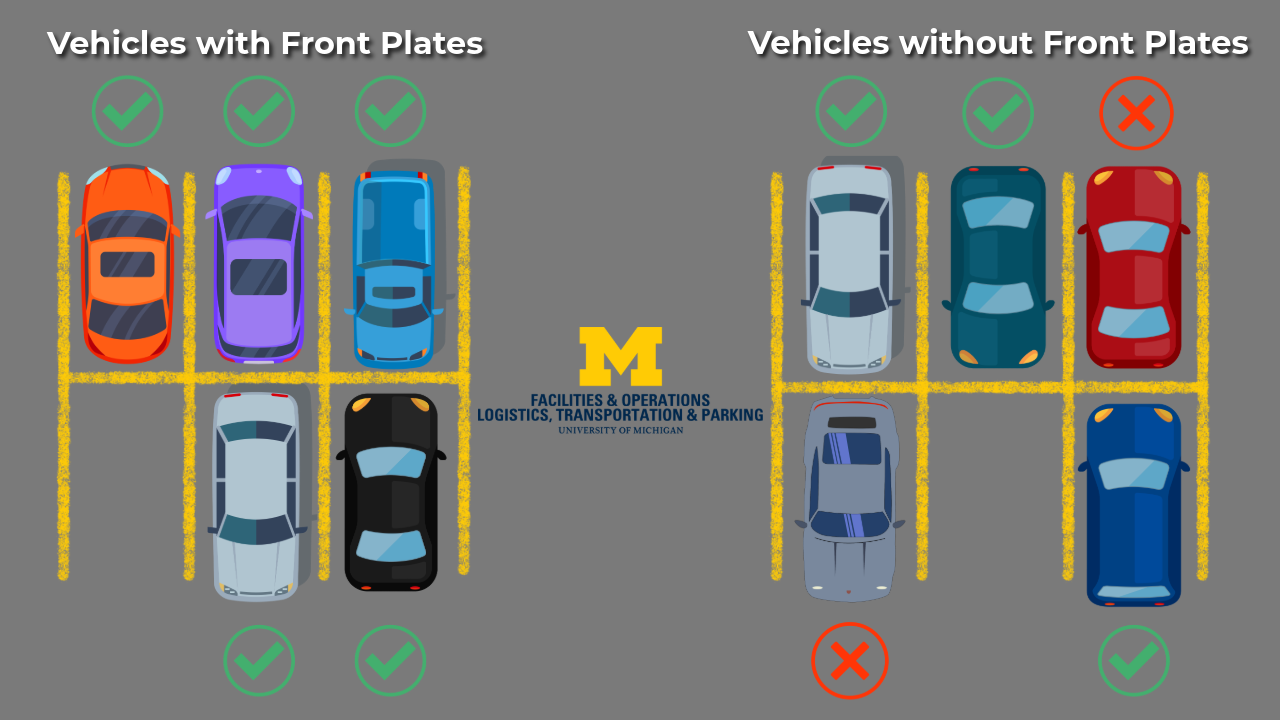
To ensure the LPR system recognizes your license plate, you must park so that your license plate faces the drive lane. If you prefer to back into parking spaces, consider obtaining a front license plate. Information on how to acquire a front plate is available in the FAQs below.
General Information
License Plate Recognition (LPR) utilizes vehicle-mounted, handheld, and stationary cameras to read and identify license plate numbers. The license plate, when registered, becomes a “virtual” permit-by-plate and no physical permit is required to be displayed on the vehicle.
Virtual Permits use a license plate number to link a parking credential to a vehicle.
In practice, your license plate becomes your permit.
When you register your vehicle’s license plate, it becomes your virtual permit. LPR cameras will scan license plates in parking areas to confirm valid permits. As long as your registered vehicle is parked according to the parking rules, no further action is needed.
You can easily go into the online portal to change your license plate number whenever you drive a different vehicle. It’s much easier than remembering to transfer your permit from vehicle to vehicle!
Yes, just as the current permit system allows, if you have a blue tier permit, you will be able to park in blue, yellow, or orange. If you have a yellow tier permit, you will be able to park in yellow and orange. If you have an orange tier permit, you will be able to park in orange.
During the transition period of July 1, 2025 – Summer 2026, if you use gated parking areas, you will still need your current physical permit (AVI) for gate access. The AVI device will be used for gate access only, not as your parking permit. Your license plate serves as your parking permit. Once all gates are upgraded to support LPR (expected between Fall 2025 and Fall 2026), you will no longer need the AVI for access.
That’s okay, we can program your Mcard for entry/exit for most gated parking areas.
This list details card reader locations on campus. If access to Forest Street Structure or P5 (CVC) are needed, please contact Parking Customer Services for an access device.
Registration and Account Management
Log into the new online portal (https://umich.aimsparking.com/) to sign up for a virtual parking permit, add your vehicle’s license plate, and agree to the parking rules and regulations.
You can log into the parking portal to update your vehicle information, add or remove a license plate, and manage your account details.
A complete step-by-step guide can be found on this page.
Virtual Permits can be transferred from vehicle to vehicle by updating the license plate information in AIMS. If you use an alternate vehicle, ensure that its license plate is registered before parking on campus.
Students are only able to register one license plate to their account.
Faculty and staff will be able to add up to three license plates to their AIMS parking account, making it easier to use alternate vehicles.
Important: Please be aware that a license plate can only be registered to one AIMS account at a time. If you need to add a license plate that is currently registered to someone else’s account (for instance, on a shared family vehicle), that individual must first remove the plate from their account before you will be able to add it to yours. To swap a plate with someone, use the temporary replacement feature. If you are switching with a U-M employee, you both need to swap your plate using the temporary replacement feature.
A complete step-by-step guide can be found on this page.
The Temporary Replacement Feature allows you to temporarily use a different vehicle on your permit, for 1 – 7 days. This is commonly used when someone’s car is unavailable, for example, and they are driving a rental car. During the temporary replacement period, the system treats the replacement vehicle as the active vehicle on the permit. After the replacement period expires, the active vehicle will automatically default back to the previously active vehicle.
This feature can be used to swap a vehicle that is currently registered to someone else. If this swap is with two U-M employees, both people need to swap their vehicles using the temporary replacement feature, as a vehicle can only be registered to one AIMS parking account at a time. By using the temporary replacement, it will remove the vehicle from one person’s permit and add it to the other’s.
A complete step-by-step guide on how to access and use the Temporary Replacement Feature can be found here.
Once you have submitted your request, you can view your active vehicle replacements at the bottom of the “Vehicles” page on your AIMS account. You can end the temporary replacement at any time by clicking the “Cancel” button.
No, virtual permits are assigned to an individual and cannot be shared. Unauthorized sharing may result in citations and revocation of parking privileges.
In order to cancel or exchange your parking permit, you’ll need to do so online. Once logged in, select the permit you’d like to cancel, then click “Request Expiration”.
There will be a text box asking if you want to exchange or cancel the permit. Once you notate which, click ‘Confirm’ and then ‘Complete’. The Parking Customer Services team will review and make the necessary change(s) to your parking permit.
Log in to your parking account at https://umich.aimsparking.com/
Then select vehicles from the left hand menu. If you’re using a mobile device, you’ll have to tap the Menu button (≡) at the top left to find the menu. From the vehicles screen, you can Add or Remove vehicles by using the appropriate buttons on the screen.
A complete step-by-step guide can be found on this page.
License Plates and Parking Orientation
No, rear license plates will be read for the new gate system. Front plates are only necessary if you prefer to back into parking spaces.
License plates need to be clean and free of debris. In order to be read, they should also not be covered by license plate cover or privacy shield, and should be in good condition (not peeling, etc.)
To ensure the LPR system can read your license plate, you must park so that your license plate faces the drive lane.
You can request a front license plate through Parking Customer Services or your state’s Department of Motor Vehicles (DMV). Please note that processing times may vary, and you may need to acquire a front license plate bracket if your vehicle doesn’t have one.
Detailed information on ordering a front plate from Parking Customer Services is listed below.
Yes! The rear plate will eventually be read by the gate system so that is what acts as your permit. Your front plate needs to match so you don’t get a parking citation if you back into a parking space.
You can order a front license plate through Parking Customer Services using the new AIMS system. Here’s how:
- Log in to the parking portal at https://umich.aimsparking.com/
- Select the option to order a front license plate AFTER your permit purchase. A valid permit is required to order a front plate.
- Pay the $15 fee, which includes shipping and handling to your home address.
- The stylized front plate will be mailed to your home address. Please note that delivery can take up to 30 days.
This front plate is an unofficial stylized plate and does not require renewal with the DMV or Secretary of State. You can order it regardless of the state your original license plate was issued in.
The cost of the front license plate is $15 and includes shipping/handling to your home address.
For the State of Michigan, front license plates are only available for personalized plates. For information on ordering a personalized plate and the secondary “decorative plate” for the front of the vehicle, please see this page – https://www.michigan.gov/sos/all-services/personalize
Each individual state handles front license plates differently, so if you don’t have a Michigan license plate, please see your individual state’s DMV for details.
That’s okay – just make sure that the temporary plate is displayed clearly and that the plate number is updated in AIMS.
The EV charging connection cords for the charging stations on campus are 18 feet, the full length of a parking space. This should allow the charging cord to reach whether pulling in or backing in.
If you still prefer to back in, a front license plate will still be needed to park in that direction, so your permit can be read.
Gate access and permit enforcement are two different checks. While the gate confirms you have a valid credential at the time of entry, the LPR enforcement vehicles perform additional checks after you park to confirm your virtual permit is valid for that specific location, date, and time.
This LPR check confirms things the gate doesn’t, like ensuring you’re using the correct permit tier, have a valid special access, or that time-based restrictions are met. Since this verification relies on reading your license plate, the plate must be visible to the LPR vehicle in the drive lane.
If it cannot be read, enforcement can’t confirm your valid permit, and a citation may be issued. Therefore, parking head-in or using a front plate while backing in is required.
Front plates need to be displayed where the vehicle manufacturer intended a front plate be displayed, in order for the virtual permit to be valid and read by enforcement vehicle cameras.
Front plates cannot be displayed in the windshield, lying directly on the hood of a vehicle, or physically obscured by other object(s) mounted to the front of the vehicle. The plate can not be read in these situations and would risk a citation.

Payment and Permit Options
- For Faculty/Staff:
- For annual virtual permits, payments must be made via payroll deduction.
- For daily virtual permits, payments must be paid by credit/debit card.
- For Students:
- All purchases must be paid by credit/debit card.
Permit pricing for fiscal year 2026 can be found here.
You can purchase a virtual permit for various durations, including daily, monthly, or annually, to best suit your needs.
Yes, if you have an Orange or Yellow virtual permit, you can upgrade to a higher-tier virtual permit (like Blue) for a day, as long as you meet the eligibility requirements. Daily upgrades can be handled via the online portal and will be the same price as a daily permit.
Payments will show on your statement as “UMich Parking Services”.
No – Gold virtual permits will be available online for those who meet Gold eligibility requirements.
Daily Parking
Daily Blue, Daily Yellow, and Daily Orange will be available to faculty and staff.
You will continue to use your current access device to enter and exit gated parking areas on campus.
As long as you have parks active on your AIMS account, you can park in the appropriate color-tiered parking areas. When your plate is read on campus, a park will be deducted from your account for that calendar day.
If you move around campus and your license plate is read more than once, only one park will be deducted for the timeframe of 12:00 a.m. – 11:59 p.m. Note: once your license plate is read as parked, there will be no refunds or credits issued.
Feel free to use gated and ungated parking areas interchangeably, as long as you have the correct color tiered permit active on your account.
Correct – scratch off permits have been discontinued for daily parking, and the daily parking option is now linked to your license plate. No more trips to the Parking Customer Service office will be needed!
Unfortunately, there are no refunds for Daily Parks. Since the LPR system is valid in both gated and ungated lots and structures, it’s okay to move to a different location based on time of day or based on availability.
This allows you to easily travel to different parts of campus with the same level and type of permit. Also recall that permits are valid in lower color tiers. Blue can park in Blue, Yellow, and Orange, etc
If you need to find out which areas have available parking, the Parking Space Availability Tool and MGoPark are both great tools to look at real-time data on parking availability.
You can check your uses remaining in two places.
The first, you can log into the parking portal (umich.aimsparking.com) and then click on “Permits”. Once the list of your permits is shown, click the “View” button next to the permit you’d like to check. The Uses Remaining will be shown under the permit information.
We’ve also created a page to check your Uses Remaining for all permits on your account. Please go to the following page and log in to see all permits with Uses Remaining on your account:
https://ltp.umich.edu/parking/permit-parking/dpt-daily-parking/pre-paid-parks-information-page/
Accessible Parking
The process to sign up is very similar. Please fill out the Accessible Parking Form, include the placard AND license plate information. The Parking Customer Services team will validate the information, then authorize the Student Blue (Accessible) Parking permit. The permit will be virtual and linked to your license plate.
Accessible parking permits will also transition to virtual permitting. When purchasing your permit in the new AIMS system, please submit your accessible parking documentation through the LTP website. Once validated, your accessible parking status will be linked to your virtual permit without the need for a physical decal.
Departmental / Guest Parking / Event parking
If your department has previously ordered guest parking permits, the departmental contact will have automatically received an account in the new virtual permit system.
Departmental contacts will be responsible for working with guest(s) to ensure license plate information is added to the system. This can be done by adding it manually, or allowing temporary access so guests can add the information themselves.
The rules and regulations related to guest permits will not be changing. Guest parking for permit areas is limited to 1 – 3 days of parking. Up to 2 guest permits per day in gated areas or up to 10 guest permits per day for ungated parking areas. Guest parking in visitor areas is not limited. For more information, please see this page
Virtual permits for departments will be billed via shortcode only.
Yes, complimentary codes will be available for visitor parking through the mobile app. There will no longer be pay machines in the visitor lots. Departments can provide a code to their guests, and the department will be billed accordingly, based on usage.
Special events will be handled using the same process. Please fill out the Special Event Parking Application Form and our team will work with you to arrange parking for your guests.
If your permit is valid for the location of a Central Campus gated parking structure that is being managed for a special event or for NC27, it will be honored and no parking fee will be required.
For all other open parking areas on campus that are being managed for special event parking, the event fee will be required. This includes Coliseum lot (W32), W39, W40, W41 or in any lots located south of Hill Street on home football game Saturdays and any lots located south of E. Hoover Avenue during home basketball games.
Your permit is still valid for parking at no additional cost in other designated U-M parking areas nearby that are outside the managed event footprint.
A number of departments may choose not to purchase a Business Vehicle permit in the new system, due to the improved convenience of daily parking options. If you previously used a Business Vehicle permit and need some guidance, here are some recommendations for traveling campus in the new system:
- Leverage Technology: Embrace the continued use of virtual meetings to reduce physical travel demands.
- Campus Services: Messenger activities can be handled by already existing campus resources print/copy/mail, bio-research shuttle, etc.
- Existing Transportation Options: U-M has a robust transit system. The use of transit should be encouraged for sustainability goals (limit single occupancy vehicle traffic on campus).
- U-M Fleet Vehicles: Departments have the opportunity to rent or lease a U-M Fleet vehicle. These vehicles are permitted to park in Blue, Yellow, and Orange spaces on campus.
- Daily Parking Permits: Staff who have a business need on campus are encouraged to purchase the parking permit best suited to meet the needs of their position. Daily parking options are available for staff that only come to campus occasionally.
- Offsite Transit Options: For “off-site” staff needing to travel to campus for meetings, the use of the East Medical Campus shuttle to the hospital is encouraged. This is a free service (no cost to park or use the transportation) for Michigan Medicine employees.
- MGoPark – Use MGoPark or the Parking Space Availability Tool to find a parking space closest to your intended destination.
Parking Citations and Enforcement
Citation fees vary depending on the violation. For those that park without the license plate facing the drive lane, the citation will be “No permits U of M lots”. For detailed information on citation types and associated costs, please visit the Parking Enforcement page.
Parking enforcement officers will use vehicle-mounted LPR cameras to efficiently scan license plates in parking areas. This technology speeds up the enforcement process and improves accuracy, ensuring better compliance with parking regulations.
Data Security, Privacy, and Opt-Out
Yes, everyone who uses Gold, Blue, Yellow, or Orange parking spaces will need a virtual permit. If you wish not to purchase a virtual permit, you can use a free parking location, including one of the Park & Ride locations (SC34 or NC37).
Our goal is to limit the information we collect to what we need to support parking operations and we are committed to using your personal information only for the purposes for which it was collected. For details on what personal information is collected and how it is being used, see the Virtual Parking Permit Privacy Notice.
Your personal and vehicle information is securely stored and managed by our PCI-compliant service provider, EDC Corporation, which develops and supports the AIMS software solution. The university’s contract with EDC requires them to keep your personal information secure, and does not allow them to use or share your personal information for any purpose other than providing services on the university’s behalf. In addition, university policies, such as Privacy and the Need to Monitor and Access Records (SPG 601.11), are in place to ensure your information remains private and secure. Requests for virtual permit data are reviewed by the U-M Privacy Office, along with the Logistics, Transportation & Parking Office (the data steward for this information).
No. The system does not link to any Secretary of State and is only using the license plate number as a virtual permit credential.
Please complete the ITS privacy request form to start the process.
Retirees
Please log in to https://umich.aimsparking.com/ to sign up for your retiree permit. You’ll follow the same process of entering your vehicle information that other parkers follow. Your Mcard will continue to be programmed for gated parking access.
Recent and new Retiree Blue and Retiree Gold requests will need annual approval from a department administrator, confirming the ongoing business need for a parking permit. More information can be found on this page.
The Retiree After-Hours permit is free. The Retiree Blue and Retiree Gold permits will be see the same 4% increase as other permit types. For more information on permit costs, please see this page.
The free Retiree After-Hours permit doesn’t expire in the new system, so you’ll have continued access to park during the program hours after you sign up. For Retiree Blue and Retiree Gold permits, there are daily and annual options.
In any Central Campus gated parking structure that is being managed for a special event, if your permit is valid for that location, it will be honored and no parking fee will be required.
For all other open parking areas on campus that are being managed for special event parking, the event fee will be required.
Your permit is still valid for parking at no additional cost in other designated U-M parking areas nearby that are outside the managed event footprint.
Other Parkers
Parking Services reached out to carpool and vanpool groups directly in May 2025. Carpooling and vanpooling will still be allowed and encouraged!
Athletics/Housing permits are still handled by their respective departments and are not transitioning to a virtual permit system at this time. If you have any questions, please contact Housing (734.763.3164) or Athletics.
As with other options, student permits will be virtual. Student parking options remain the same. Permits such as After Hours and Student Storage will continue to function as before.
Physical permits will no longer be honored on campus. Therefore, if you are visiting from the Flint or Dearborn campuses, please purchase a daily virtual parking option for your visit to campus.
Motorcycle and Moped parking is not impacted at this time and no permit is required. Please continue to use the designated areas for motorcycle and moped parking.
Parking Customer Services
Central Campus
523 South Division
Ann Arbor, MI 48104-2912
Mon – Fri 7:30 a.m. – 4:00 p.m.
Drop Box: Thompson St. Structure West side, level 1
University Hospital
UH South Room F2117
Ann Arbor, MI 48104-2912
Monday – Friday 7:30 a.m. – 4:00 p.m.
Closed for lunch 1:00 p.m. – 2:00 p.m.
Drop Box: UH South Room F2117
Phone: +1 (734) 764-8291
Fax: +1 (734) 763-4041
Contact: Contact PCS