Parking Rules & Regulations
Welcome to the University of Michigan parking system managed by Logistics, Transportation & Parking (LTP). This page outlines the rules, regulations, and your responsibilities within the parking system.
General Information
Permit Year
The permit year begins July 1st and ends June 30th. All annual parking options issued are for this period.
Virtual Parking Permits
Parking permits at the University of Michigan are virtual. Your license plate must be registered and active in the parking management system in order to be valid.
In order for the virtual permit to be read, your license plate must face the aisle/drive lane. Failure to park in an orientation where your parking credential faces the drive lane and is readable could result in a parking citation.
If a front plate is used to allow backing into or pulling through parking spaces, front plates need to be displayed where the vehicle manufacturer intended a front plate be displayed in order for the virtual permit to be valid and read by enforcement vehicle cameras.
Front plates cannot be displayed in the windshield, lying directly on the hood of a vehicle, or physically obscured by other object(s) mounted to the front of the vehicle. The plate can not be read in these situations and could result in a parking citation.
Permits are for your use only and is not to be sold or transferred to others. The only exception to this policy is for official carpools consisting of eligible faculty and staff who share one parking permit.
If you order a parking permit and it becomes active on your account, you are responsible for payment for the active period. If you have a permit for even one day in a month, you are financially responsible for that month.
Any debt on account will make the customer ineligible to obtain a parking permit. Once the debt is paid in full, a customer can purchase a parking permit under LTP’s standard eligibility criteria.
Color-Coded Parking
All faculty and staff parking lots and structures are color-coded: gold, blue, yellow or orange. Parking permits in corresponding colors authorize access. On maps and signs, visitor parking is color-coded
red, and patient parking is color-coded green. Faculty and staff permits are not honored in these locations.
Color-coded parking permits are NOT valid in any lot or structure that is actively being used for event parking. This includes lots south of Hill Street or lots W32, W39, and W40 for home football games, or
in lots on Kipke Drive for home basketball games. Home football games: all vehicles must exit lots south of Hill and W32, W39, and W40 by 10 p.m. on Friday. Vehicles left in lots used for Athletics event parking will be towed.
Park in Designated Spaces
Parking is allowed in designated spaces only—striped on paved surfaces or at bumper blocks on gravel surfaces.
Permit parkers must observe and comply with special parking restrictions that are posted at the entrance and/or within the parking area.
A parking permit does not guarantee you a parking space in a particular lot or structure. If the lot or structure you want to park in is full, you are responsible for finding a valid parking space in another parking area of either the same color tier or a lower color tier.
Smoking in Structures
Smoking is prohibited in all University facilities, including parking structures.
Storage Parking
No person shall park a motor vehicle for forty-eight (48) or more consecutive hours in any parking area of the University of Michigan, except in designated Housing and Student Storage parking areas with a valid parking permit. In addition, there is NO overnight parking allowed on Ross Athletic/South Campus, or in W32, W39, or W40.
Emergency Access to Gated Structures
Those requiring access to gated structures during enforcement hours for tow trucks or emergency vehicles should contact the Gate Assistance Helpline at (734) 763-5555 or the Division of Public Safety & Security (DPSS) at (734) 763-1131 for assistance.
Motorcycle and Moped Parking
Motorcycle and moped parking is located in selected Blue parking structures and in some Blue, Yellow and Orange parking lots. These areas are indicated on the parking map and on signs at individual lots
and structures.
No permit is required. Motorcycles and mopeds may not park in bicycle racks and must park in designated spaces signed for motorcycles and mopeds.
Trailers, RVs and any Oversize Vehicle
Trailers, RVs and any type of oversized vehicles are not allowed to park in University parking lots or structures, unless permission is granted from the Parking Customer Services office. Exceptions for RVs are made for specifically designated parking areas for home football games and for patients’ families at the U-M Hospital.
Parking Fraud and Abuse
Parking fraud and use of parking options in disregard of the defined rules and regulations will result in severe penalties.
Any person found to be using, or to have participated in or facilitated fraudulent use of, any parking option in disregard of the rules and regulations governing its use, as stated in this guide, will be prohibited from obtaining a parking option or participating in a program through LTP. This penalty will be imposed in addition to any criminal charges or disciplinary actions from any other University department, school or college (up to, and including termination).
Fees associated with the fraudulent use of an option will be charged, when applicable, and must be paid in full.
University of Michigan parking permits are intended for the use of faculty, staff and students who need to commute to and from work in their automobile. Using the University parking facilities beyond the intent of the parking program (for example: patterns of vehicle storage in a parking area) or other misuse can result in the loss of parking permit privileges.
Parking Signage
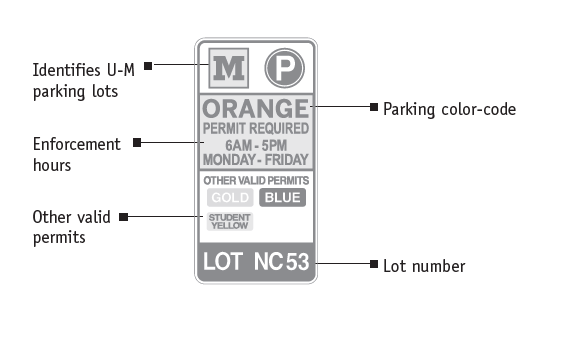
University lots and structures are identified by signs located at the entrances. The signs indicate the parking color, permits required and enforcement hours:
Payroll Deductions
LTP offers continuous payroll deduction plans for parking permits. All payroll deductions are taken before taxes are withdrawn (known as a pre-tax deduction), further reducing your actual parking expenses. The range of savings will vary depending on your individual tax rate. If in any month your payroll deduction fails to process, the amount of your payroll deduction will be recalculated to ensure collection of the annual fee within the remaining payroll deductions.
Continuous (Non-Expiring) Parking Options
These permit options are perpetual parking permits that do not expire. The continuous payroll deduction authorization allows a deduction to be taken once a month from your paycheck for as long your account maintains good standing. If you leave the University and/or your payroll deductions stop, parking permit access will be turned off. The Continuous Payroll Deduction Authorization is as follows:
I authorize the non-expiring parking permit option fees to be paid by pre-tax payroll deduction, once each month from payment of my wages in equal installments. I understand and agree that this authorization shall continue for the entire time I maintain an active parking permit issued by the University. I also understand that the annual parking fee may be subject to yearly increases, and I authorize the University to increase the monthly payroll deduction accordingly. I understand that I can terminate this deduction by deactivating my parking permit and paying any remaining balance.
I understand and agree that should my payroll deductions be interrupted during any month, the remaining monthly deductions may be altered to ensure collection of the entire annual balance due within the permit year. I understand that monthly prorations of the annual parking option fee will continue to accrue and that I will be financially responsible for the parking option fee unless and until the parking option is deactivated. If the option is deactivated, I authorize the University to deduct the remaining balance due, if any, of the parking options fee from the last payment of wages or any other payments made to me. I agree to promptly pay any amounts due if I return the permit after the date of the last payment of wages.
How to Use Your Mcard for Structure Access
If you have a color-tiered permit that allows access to gated parking lots and structures, the gates can be activated by using your Mcard for both entry and exit.
(Note: Existing AVI device holders should continue using their AVI as their primary gate access method during the transition period, though their Mcard serves as a backup). The Mcard will become the universal backup access credential once all parking gates are fully LPR-enabled.
When using your Mcard, there are currently two main types of readers at gates:
Swipe Style Reader:
Place the card at the top of the reader slot.
Swipe the card fully through the reader (top to bottom) in one smooth downward motion.
Ensure the card faces up (photo side towards you) with the magnetic stripe on the right, inside the reader slot.
(Hint: Applying slight pressure towards the stripe side can help ensure good contact, especially if your card is slightly bent.)
Insert Style Reader:
With the card facing upward (photo side up), insert it into the reader slot and then immediately remove it.
If for any reason your card does not activate the gates, phone the AVI Helpline at (734) 763-5555 for assistance. The most typical reason a card may not work is failure to swipe in or out. Remember, each entrance must have a corresponding exit and vice-versa. If entry and exit do not “sync,” your card may have to be reset to work correctly.
Additional Resources
The resources listed below are links to other policies and procedures related to the parking system.
Privacy Policy related to Parking Permits
Enforcement Information
Permit Parking Options and Eligibility
Parking Information for New Employees